
How I can prune "one version each month on last 12 months"?

I want to set up Duplicacy versioning like CrashPlan (see screenshot).
Suppose I run a backup every hour.

How can I achieve this, for example, by setting “keep one version each month for the last five years”? As far as I understand, the prune command option -keep 60:180 gives 60 versions (5*12), but how can I guarantee that these will be versions from each month?

Is this possible with Duplicacy?

The same question applies to settings for 90 days, months, and weeks. If possible, how should this be specified in Duplicay? If not possible, what is the closest setting you would recommend?
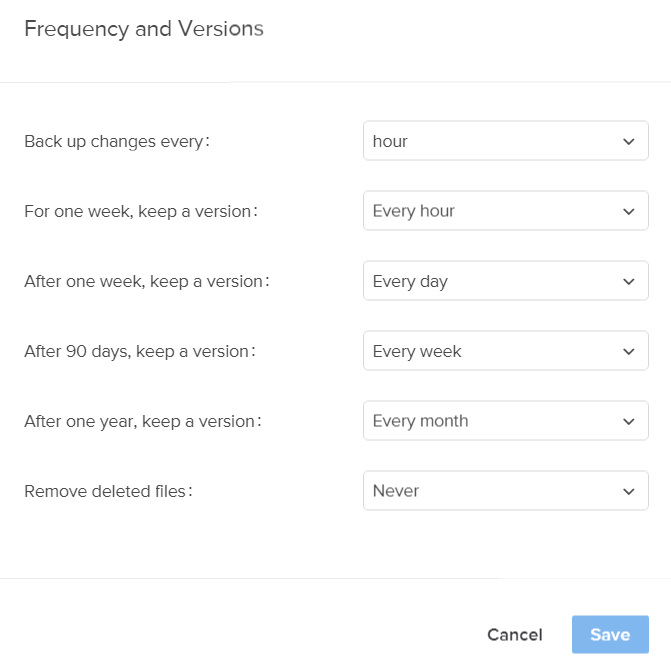
CrashPlan versioning 2021-05-20|507x499

No. This parameter instructs prune to remove all revisions older that 180 days, except keeping one every 60 days.

See prune · gilbertchen/duplicacy Wiki · GitHub

After one week keep a version every day: -keep 1:7

After 90 days keep a version every week: -keep 7:90

After a year keep a version every month: -keep 30:365

It maps cleanly.

So your final command will be (note the sort order, duplicacy evaluates from let to right)

(Edit: prune -a -keep 30:365 -prune 7:90 -prune 1:7 typo, seee below)

prune -a -keep 30:365 -keep 7:90 -keep 1:7

I believe that should be prune -a -keep 30:365 -keep 7:90 -keep 1:7

(Same numbers, but -keep instead of -prune.)

1 Like

Lol. Yes, of course. My bad.