Support for dataless files

Today most of the Drive services adopted the modern way to handle cloud storage on macOS – via the FileProvider API.

For example, Box.com’s native client moved from using custom filesystem driver to FileProvider few years ago, and stability soared. GoogleDrive departed from osxfuse, took the detour of using local SMB server, but as of today, they too adopted file provider. Dropbox did the same. iCloud itself obviously complies to the same protocol.

Now, today for most people data lives in the cloud. Yours truly has a computer with a 512GB local storage and about 4TB worth of data in iCloud and Google Drive combined. Up until recently the only way to backup that data was via mounting the storage locally using various FUSE based solutions, or syncing the whole thing. Fuse is dead for all intents and purposes on macOS – I"m not going to disable all security just to have a privilege of destabilizing my OS with some buggy filesystem implementation. Kernel extensions for mundane things like file sync are a thing of the past.

With the adoption of File providerAPI this is no longer required either. Instead, Duplicacy could materialize the file, if the metadata changed, back it up, and then optionally, ephemerize it back, or just leave it to the OS to manage.

If this justification for the feature is not convincing enough – here is another one: competition already does it:

  • Added a backup plan option so you can specify whether to report, ignore, or materialize dataless (“cloud-only”) files such as Dropbox and Google Drive files.
4 Likes

Bumping this to point out that another competitor is likely to provide this feature quite soon: I’ve been using a dev version of restic that offers support for dataless cloud files, and it works brilliantly.

This enables me to back up to cloud storage on the laptop I share with my wife (which requires us to use the “optimize” feature in iCloud Drive). Looking at the code change, it didn’t seem that complicated to implement in restic.

As @saspus points out here, the move to FileProvider API, along with the ubiquity of synced cloud storage, means that this will be an increasingly helpful and user-requested feature. If the next stable version of restic does indeed merge this branch, it will make it hard for me not to choose restic over duplicacy.

1 Like

I’m in the same boat, 3TB of data in iCloud, and 512GB shared MacBook Air. I keep using Arq. Waiting for duplicacy to catch up. This is a basic requirement by now.

(The Photos Library still requires separate handling, but I’m just exposing last year worth of media every year onto a NAS.)

I know this is a very old thread, but I’m updating it because I think it’s relevant.

The competitor I mentioned a year ago has now implemented --exclude-cloud-files into its main branch. It’s just that single flag.

I’ve acquired a new laptop for summer travel, and I need to use iCloud Drive’s “optimize” feature. This means I simply cannot use Duplicacy on this machine.

Would not it just backup .iCloud placeholders? Not ideal, but it should not fail.

But ultimately we need materialization support — otherwise Swiss cheese of random files is not a backup.

When I tested this a year ago, Duplicacy just materializes each could file it encounters. So it doesn’t fail.

But the only reason I have optimized turned on is because I don’t have room on the local SSD for all the iCloud files, so materialize isn’t a viable option for me.

My iCloud files are all already in my duplicacy storage from another machine. I only want it to backup new files that are local, and skip all the cloud placeholders.

I see. I just checked, there are no placeholders anymore: the system presents full filesystem but (the system, not duplicacy) downloads files on demand when anyone attempts to read data from them. It also will (should!) offload automaticaly when space gets low. That may or may not happen fast enough though…

Either way, after first backup completes, on the next run, if the metadata does not change, it shall not force materialization.

You can use %Sf to have stat tell you which file is dataless and to confirm that metadata is readable even if file is not materialized:

% ls -alt {one,two}.pdf
-rw-------  1 me  staff  545109 Aug 12  2025 two.pdf
-rw-------  1 me  staff  386829 Aug 12  2025 one.pdf

% stat -f "%N: %Sf"  {one,two}.pdf
one.pdf: -
two.pdf: compressed,dataless

So technically, duplicacy does not need to do anythign anymore to support dataless files. It shall already work. And arguably, it’s a better solution: application should not need to know if the file is local or not or do anythign differently, it shall be handled by the OS. And now, it is!

That all makes sense, but just to say there’s a lot of work being done by that tiny parenthetical:

(should!)

It means I have to trust Apple. And the current MacOS is already greedy with drive space: the local time machine backups (on the SSD) will sometimes take up 75Gb of space – it just keeps eating whatever it wants.

The other way of putting it is that Apple has configured MacOS so that its understanding of drive space getting “low” is very different from mine. I feel better with lots of free space, and it’s happy to eat a lot of it up.

Right now I have 400Gb free, and if I run duplicacy backup I bet it will take me under 50Gb. Hmmm…

Fair :slight_smile: But I have justification.

This is by design. Empty space == wasted space. Might as well use it for something useful – e.g. user data snapshots. Same approach is taken on most sane OSes to RAM: keep close to zero free ram at all times: empty ram is waste of resources, most OSes fill unused memory with disk/filesystem caches. My FreeBSD home server with 128GB ram shows 0.5GB free, 20GB used, and the rest – disk cache (ARC). And it’s great.

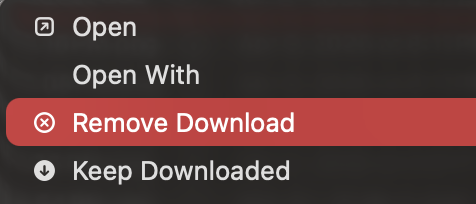
It should be able to evict data on its own, as available space goes beyond 10-20%. But if can’t do it fast enough – eviction is background process, and duplicacy will be aggressively materializing data in the foreground — you can help I guess manually:

image

Or temporarily increase priority of background processes:

sudo sysctl debug.lowpri_throttle_enabled=0

Either way, you will need to go through this exactly once. After duplicacy does first backup, subsequent backups should not force materialization unless files changed. And if they did change - you do want it to actually materialize and backup.